Keep the agreement together.
Record reservations, handover and return readings, agreed rates and invoice preparation.
ONE WORKSPACE. EVERY MOVING PART.
Connect commercial and passenger transport with vehicle rentals, expenses, deposits and financial records. Give your team a clearer path from daily work to management review.
Interactive demo · Fictional records and simulated GPS · No registration needed
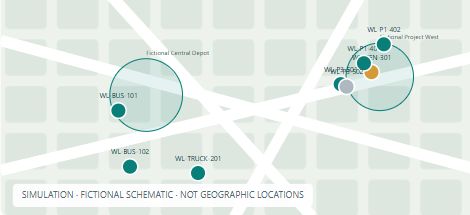
Search by vehicle type, follow a sample vehicle and explore the map controls.
NEW / RENTAL & FINANCIAL WORKSPACE
Bring rental agreements and financial records into your transport workflow. Watch the product overview, then request a guided demonstration of the new modules.
42-second illustrated product overview. Every label and value is fictional. Captions are visible throughout; no sound is needed.
Record reservations, handover and return readings, agreed rates and invoice preparation.
Track customer invoices, supplier bills, recorded payments, deposit refunds and applications.
Review the ledger, trial balance, profit and loss, and balance sheet. Download Excel charts or print to PDF.
Use VIN lookup where coverage is available. Import tolls and fines, match identifiers and review charges before recovery.
Protected login and separate customer records. Discuss the modules, setup and training your team needs.
Rental and financial modules are shown by guided demonstration; they are not included in the public fleet demo. Module scope and pricing are confirmed in your quotation. Payments are recorded manually; card checkout, payroll, statutory tax filing and automatic government toll/fine connections are not included.
FROM ACTIVITY TO ACTION
Bring planning records and fleet activity into the same review process.
See which vehicles show engine-on activity after a selected cutoff, including idling.
Compare idle totals and check data coverage before drawing conclusions.
Compare required service times with recorded deployment dates and times.
Keep driver shifts, allocations and availability visible to the transport team.
A CONNECTED OPERATION
Keep each team’s daily work focused, while bringing the wider operation into view.
Manage requirements, approvals and allocations with powered vehicles, linked trailers and drivers in one workflow.
Connect staff transport requests, approvals, vehicle assignments and daily passenger counts.
EXPLORE THE APPLICATION
Actual screenshots from the public Worklane Apps demo. Every vehicle, value and boundary shown here is fictional.
Search by type, follow vehicles and review simulated movement.
Try monitoring →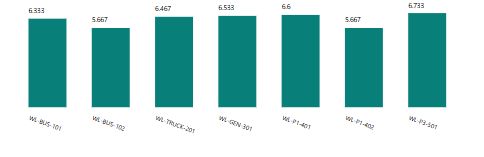
Explore daily activity, pickup idle time and after-hours reports, with Excel, PDF and CSV downloads.
Explore reports →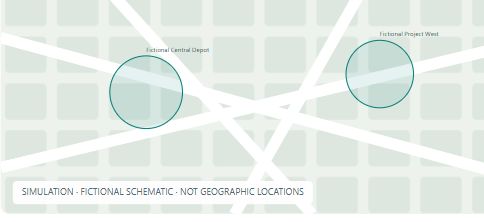
Explore sample boundaries and add a temporary zone within your demo session.
Try geofences →FROM REQUEST TO REVIEW
TURN RECORDS INTO DECISIONS
Review service fulfilment, idle assets and outsourcing trends. Compare months and identify where the operation needs attention.
The application includes monthly targets, service delay analysis and idle asset reporting. Excel and PDF report exports are available in the application; this illustration is a walkthrough.
Requests received, services provided, pending work and recorded deployment delays.
Recorded and calculated idle periods, with estimates based on entered rates.
Compare confirmed trip volumes and monthly outsourcing percentages against targets.
SUBSCRIPTIONS THAT FIT YOUR OPERATION
Monthly software subscriptions, with setup and training quoted separately. Discuss your fleet size and workflows so we can agree the right scope.
TRANSPORT ESSENTIALS
AED 399 / month
For teams organizing commercial and passenger transport.
FLEET & OPERATIONS
AED 799 / month
For teams adding connected fleet monitoring to transport workflows.
ENTERPRISE
Custom quote
For larger fleets, multiple branches or specialized requirements.
Starting setup: AED 1,000 for Essentials or AED 2,000 for Fleet & Operations. Complex imports, configuration and custom development are quoted separately.
An active asset is one vehicle, trailer or equipment record. GPS-linked assets count within the plan limit. Extra capacity, hosting and support terms are agreed in writing before any additional charge.
GPS devices, fuel sensors, RFID readers, SIM/data plans, installation and third-party tracking/API fees are separate from the software subscription. Applicable taxes are additional.
TRY IT WITH YOUR TEAM
Proposed pilot: AED 750 for 30 days, up to 10 assets and 3 users, with one remote onboarding session. GPS integration is subject to compatibility and authorized access. No automatic subscription conversion.
Indicative starting prices in AED, billed monthly. Final scope, compatibility, pricing and service terms are confirmed in a written quotation. Enquiring does not start a subscription or take payment.
MAKE IT YOUR OWN
Discuss the workflow, records and reports your team needs. Final scope, hosting, support and pricing are agreed before work starts.
Company identity, initial configuration, agreed master-data imports and an introduction to daily workflows.
Adapt forms, approval steps, dashboards and reports around an agreed operational requirement.
Arrange maintenance, training and further development with clearly defined responsibilities.
NEW / FLEET INTELLIGENCE
Explore simulated live movement, mouse-wheel zoom, vehicle search and type filters, journey playback, geofences, 17 analytics categories and six customized reports. Download sample charts in Excel and PDF, or export CSV.
Follow a fictional vehicle, search by type, zoom the map and review playback. Missing readings stay visibly unknown.
Fictional fuel, driver-card and boarding examples show the intended workflow. Hardware and identity validation are scoped separately.
Explore daily activity, after-hours pickups, fleet status and pickup idle reports, plus sample geofence creation and connected-operation examples.
All data and map geometry are synthetic. No customer vehicles, documents or tracking credentials are used. Production integrations require customer authorization and testing.
LET’S TALK ABOUT YOUR WORKFLOW
Tell us about your fleet and the modules you need. We can discuss a tailored demonstration, setup or custom development.
A FEW PRACTICAL QUESTIONS
The public demo focuses on fleet and transport workflows. Request a guided demonstration for rental agreements, expenses, deposits and financial reports using fictional data. Your quotation specifies the modules and limits included.
No. This demo uses a separate database with entirely fictional records. It has no connection to an operational company database.
Transport records in this visitor preview are read-only. The fleet demo allows temporary sample geofences in your browser session; they reset on reload. Document uploads and account administration are disabled.
Yes. Worklane Apps is our product brand. A customer installation can use your company identity, agreed workflows and reports.
Hosting and data access are agreed for each installation. The public demo uses fictional data; client installations have their own private data.